This article is a stub. Full walk-through coming soon.
Turn on subscriber-only mode
Tap the diamond icon in the compose bar to toggle subscriber-only mode. The compose bar highlights with a blue/teal outline to confirm.
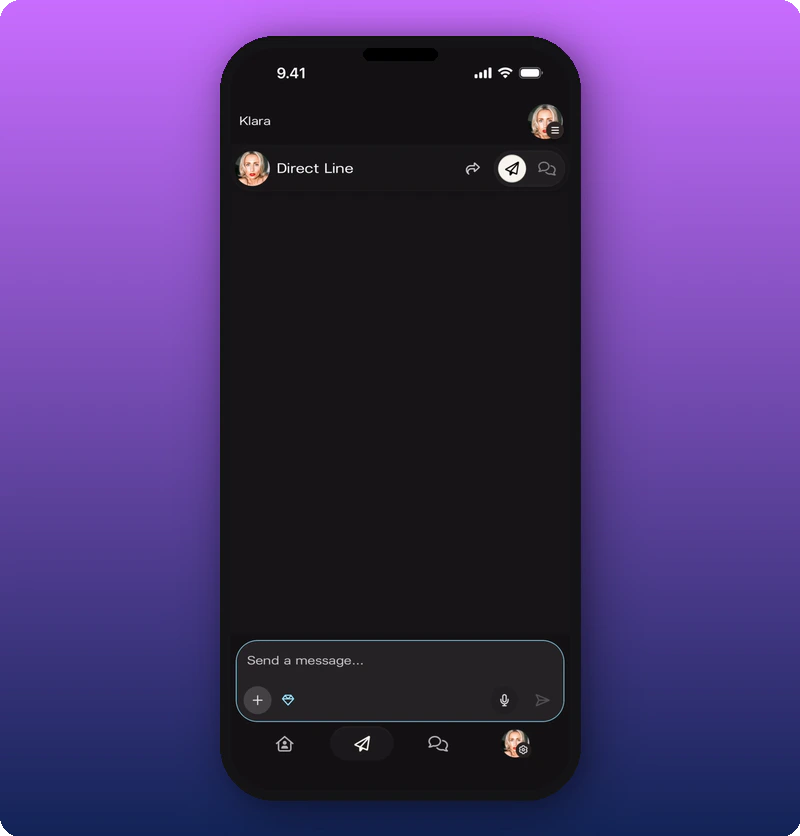 What you’ll see: The diamond icon next to the + button is highlighted in blue/teal. The compose bar has a glowing outline. This visual change confirms subscriber-only mode is active — only paying subscribers will see the next message sent.
Send the message
Compose and send like any other Direct Line message. The message will only be visible to fans with an active subscription.

Turn subscriber-only mode back off
Tap the diamond icon again to toggle off. The compose bar returns to default. Your next message goes to everyone.
When to use it
- Early demos, unreleased music, snippets.
- Personal thank-yous to subscribers.
- Perks that aren’t for the whole room.

